In the software world, people can’t agree on a single way to solve any one problem. Different developers, companies, and communities often prefer different approaches because they try to solve different problems. That is why so many programming languages exist, and new ones continue to appear. There are a lot, really, as you can see in the screenshot below.
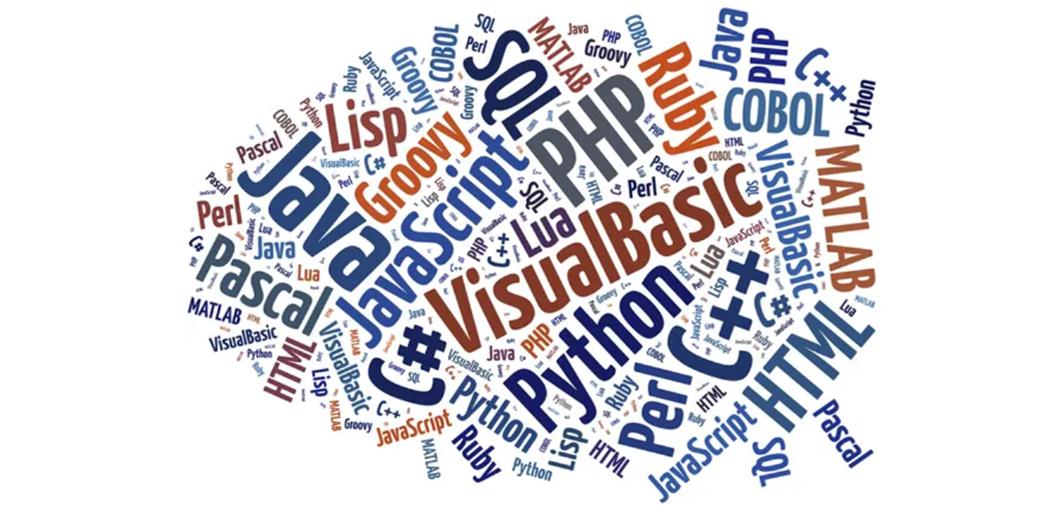
Each language is designed with certain goals and a specific problem in mind. Some focus on performance and low-level hardware control, while others focus on simplicity and faster development. As a result, every language has its own strengths, limitations, and areas where it works best.
Of all those programming languages, Python is currently ranked as number 1 as most widely used. But why is that? What makes Python best? Let’s zoom in on the different properties of a programming language and see where Python fits in.
Typically, the three most distinctive properties of a language are whether it is low-level or high-level, whether it is compiled or interpreted, and whether it is statically or dynamically typed:
- High-level vs. Low-level describes how far the language is from the hardware.
- Compiled vs. Interpreted describes how the language implementation executes the code.
- Statically vs. Dynamically typed describes when variable types are checked and whether they can change during program execution.
Low-level vs. High-level Programming Languages
Programming languages can be described as low-level and high-level. This is based on how far the language is from the hardware (the Operating System, CPU, and RAM), as shown in the diagram below.
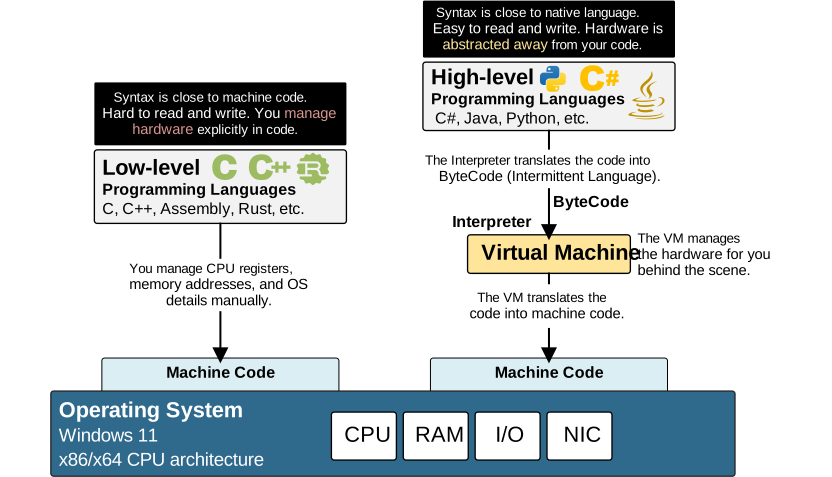
Everything that a computer does is done by the processor – the CPU. Every application that is started on your computer (including the OS) is given some time to talk to the CPU. However, at the lowest level, the CPU understands only machine-code instructions.
Machine code is made of binary values represented by 0s and 1s. Each instruction tells the processor to perform a simple operation, such as moving a value into a register, adding two numbers, reading data from memory, or jumping to another instruction. You can check out the Intel x64 manual, just for example.
Additionally, there are multiple types of CPU architectures – Intel x86, Intel x64, AMD, Apple M chips, Apple A chips, Qualcomm, etc. Different processor architectures understand different machine-code instructions. For example, a program compiled for an Intel x86 processor cannot normally run directly on an Apple M4 chip and vice versa.
The operating system is also software. Its code is compiled into machine instructions that are executed by the CPU. Therefore, the operating system must also support the CPU architecture.
For example, an operating system built for the Apple M4 processor cannot normally be installed on a computer with an Intel x64 processor, and vice versa. The operating system manages the environment in which applications run. It:
- loads the program into memory;
- gives it CPU time;
- manages RAM and I/O access;
- prevents one program from accessing another program’s memory.
The operating system's scheduler divides CPU time into small time slices, typically lasting only a few milliseconds. It rapidly switches between active applications to give the illusion of simultaneous execution. You can imagine the CPU executing a loop where it says:
“App X, it is your turn to use the CPU. It will fetch your instructions from memory and run them.”
After a few milliseconds, the OS pauses that application and allows another to use the CPU, and so on and so on.
Lower-Level Programming Languages
The CPU is very exact. The CPU does not understand what a program is supposed to achieve. It simply follows the instructions it receives, in the exact order they are written, even when those instructions make little sense.
Low-level languages such as C are close to the computer hardware (the CPU and the OS). C allows programmers to give exact instructions to the CPU and the OS– for example, a programmer can tell the CPU:
“Store this variable at this exact address in memory”.
This is extremely powerful if you want to write super-fast, hardware-optimized code such as operating systems, drivers, games, or other high-performance apps.
But on the other hand, this requires programmers who know exactly what they want to achieve and how the hardware works at a low level in order to achieve it. It also makes the syntax and structure of code much more complex and harder to read than other languages.
But we are network engineers, not software developers.
We don’t know how the CPU works, what CPU registers are, what memory addresses are, and how everything fits together. We want to write code that loops through a list of devices and returns all configured VLANs.
- Do we care where the CPU stores the variables in memory? No, we don’t.
- Do we care which registers the CPU jumps to? No, we don’t.
Well, that’s why the industry invented high-level programming languages like Python for people like us.
High-Level Programming Languages
High-level programming languages abstract the hardware away from the program code and manage it behind the scenes. By doing so, they can also make the syntax as close to native human language as possible. For example, you can probably understand what the following Python code does, even though the code is not a simple program and you may not have any prior Python experience.
#!/usr/bin/env python3

device_list = ["R1", "R2", "SW1", "SW2", "SW3", "SW4", "SW5"]

router_count = 0
switch_count = 0

for device in device_list:
   if device.startswith("R"):
       print(device, "is a router")
       router_count = router_count + 1
   else:
       print(device, "is a switch")
       switch_count = switch_count + 1

print("Number of routers:", router_count)
print("Number of switches:", switch_count)
Keep in mind that the code is not simple at all. It includes a few different kinds of variables, if-else logic, objects, methods, and operators. However, even if you don’t have any prior Python experience, I am pretty sure you understand what it does 100%. Well, that’s one of the main advantages of high-level languages.
The program goes through a list of device names. If a name starts with R, the device is counted as a router. Otherwise, it is counted as a switch. At the end, the program displays the total number of routers and switches.
This code highlights another big advantage of high-level languages. They hide most hardware details from the programmer.
- Do you see me telling the CPU where to store the device_list variable in memory? No.
- Do you see me telling the OS how memory is released when the variable is no longer used? No.
- Do you see me telling the OS how individual characters are displayed on the screen? No.
Python Virtual Machine (PVM) handles these tasks for me behind the scenes. High-level languages like Python focus on the problem we want to solve rather than on the hardware that executes the solution.
Additionally, the code above can be executed on Intel x86, AMD, Qualcomm, or Apple M1 processors, and it will work the same. So high-level programming languages are typically cross-platform.
Analogy: Computer hardware as a restaurant
To better understand the concept, let’s make an analogy with something pretty well known. Let’s say that the computer hardware (specifically, the Operating System and the CPU) is a Restaurant, as shown in the diagram below:
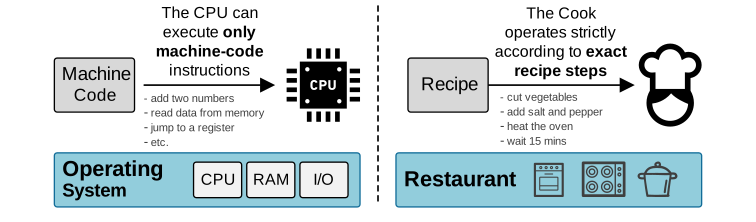
- The CPU is the cook.
- The machine code is the detailed recipe that the cook understands.
- The source code is the order written by the waiter.
- The compiler is a kitchen manager who knows how to translate the order into an exact recipe.
- The operating system (OS) is the restaurant.
The restaurant (the operating system) decides:
- which order is prepared first;
- which tools and ingredients are available;
- how different cooks share the kitchen;
The cook can only cook strictly following an exact step-by-step recipe. The cook cannot take orders from clients directly.
Now imagine you are the waiter in this restaurant. A client wants to order a green salad. Writing in low-level language means that instead of writing “Give me a green salad” to the kitchen, you write “Wash and dry a cup of lettuce and spinach. Slice a cucumber into thin rounds. Cut ten cherry tomatoes in half. Add a spoon of olive oil. Add a tablespoon of salt…” and so on.
You see the difference, right? For some tasks, it doesn’t make sense to go to a low level.
Compiled vs. Interpreted Programming Languages
We have already established that the CPU understands only machine-code instructions. It cannot directly understand Python, C, Java, or any other programming language. Consider the following Python code:
print("Hello, World!")This instruction is clear to us, but it means nothing to the CPU. Before the processor can do anything with it, the instruction must pass through one or more translation layers.
Programming languages generally use two main approaches to perform this translation:
- The program can be compiled before it runs.
- The program can be interpreted while it runs.
These approaches describe how the language implementation translates the programmer's source code into machine code for execution.
Compiled Programming Languages
In a compiled language, a program called a compiler translates the entire source code before the application is started. For example, imagine that you write a program in C. The processor cannot execute the C source code directly. You must first pass the source code to a C compiler. The process looks like this:
Entire C source code -> C compiler -> Entire source code into Machine code -> CPUThe compiler examines the entire program and translates it into machine code instructions for a specific operating system and CPU architecture. The result is an executable file (for example, on Windows it is typically a .exe file).
When the user starts the application, the operating system loads the executable file into RAM and allocates CPU time to it. The processor can then execute its machine-code instructions directly.
Compiled languages focus more on early error detection, performance, and direct control over the final program.
Let’s return to our restaurant analogy.
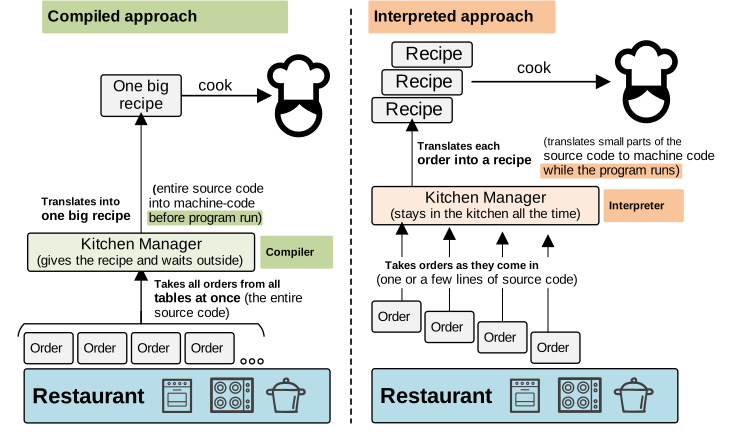
Suppose the entire source code is the orders from all waiters from all tables in the restaurant. The compiler is the kitchen manager who takes all orders at once (the entire source code), translates them into one big, detailed recipe (the entire machine code), and then gives it to the cook to prepare.
With a compiled program, all orders are translated into a full recipe that is prepared before cooking begins, as shown in the diagram below. Once the translation is complete, the cook can follow the instructions without having to ask the kitchen manager to translate each step again. This is one reason compiled programs have better performance. Most of the translation work has already been completed.
Compilation also helps catch many errors before the program starts. For example, the compiler may detect missing functions or incorrect data types. The programmer must correct these problems before the compiler can create the executable file.
But if this is a real restaurant, would this approach be the best for the clients? Well, it depends. In most cases, not. But what if there is only one waiter? Would you prefer to wait for him to go to each table, then to the kitchen, and back to the next table? Or would you prefer him to take all orders from all tables and give them to the kitchen? Probably yes.
Neither approach is always better. It always depends on the use case. As is always the case in networking (as you already know).
However, compilation has a trade-off. Separate machine code is created for every particular platform. A program compiled for a Windows computer with an Intel x64 processor cannot normally run directly on a Mac with an Apple Silicon processor. The same source code may need to be compiled several times:
- Source code -> Windows x64 executable
- Source code -> Linux x64 executable
- Source code -> MacOS Apple Silicon executable
The compilation process also takes time. For large source code, it can take minutes/hours. So, every time you change something, you need to wait for the code to compile before testing it.
Interpreted Programming Languages
An interpreted language uses a different approach, as you have already seen on the right side of the diagram above. Instead of translating the complete source code into a standalone machine-code program before execution, an interpreter remains involved while the program is running (during runtime).
The interpreter reads the program’s instructions line by line (or part by part), processes them, and performs the required operations. A simplified view looks like this:
Python Source code -> CPython compiler -> Python bytecode -> PVM -> OS and CPUIn the restaurant analogy, the interpreter is like a kitchen manager who stays beside the cook while separate orders come in. The manager reads each order, prepares a recipe for it, and gives it to the cook. The kitchen manager remains involved until the order is complete.
This provides several advantages.
You can change the program and run it again immediately. You do not normally need to create a new executable file manually after every small change. This makes interpreted languages convenient for testing, automation, and rapid development.
The same source code can also run on different platforms, provided that a compatible interpreter is installed on each platform. For example, the following Python code can normally run without modification on Windows, Linux, and macOS:
device_list = ["R1", "R2", "SW1", "SW2"]
for device in device_list:
   print("Checking", device)
The Python code remains the same. What changes is the Python interpreter installed on the computer. The Windows version of the interpreter knows how to communicate with Windows. The Linux version knows how to communicate with Linux. The macOS version knows how to communicate with macOS.
The interpreter therefore acts as a middle layer between your Python program and the platform underneath it.
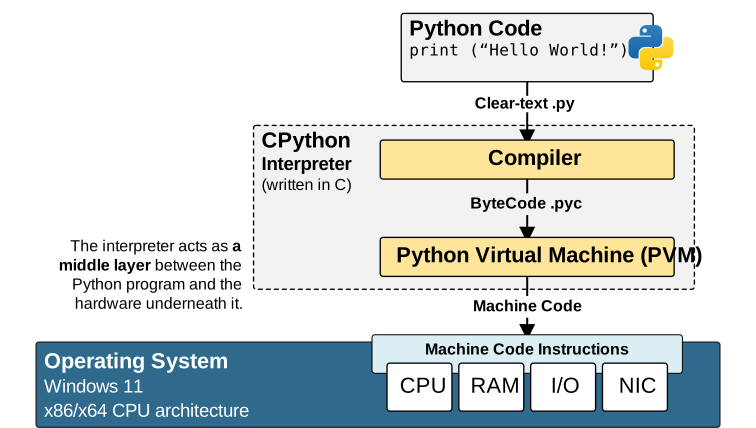
The disadvantage is that the interpreter must perform some work while the program is running. This creates additional overhead compared with machine code that the CPU can execute directly.
Some errors may also remain hidden until the interpreter reaches the affected instruction. A program may start successfully, run for some time, and then stop because it reaches an invalid operation.
Notice that the Python Virtual Machine does not execute your clear-text Python source code directly. The interpreter first compiles the source code into an intermediate language form called bytecode.
Suppose you run this program:
print("Hello, world!")First, CPython checks the syntax and converts the instruction into Python bytecode. Bytecode is lower-level than Python source code, but it is not the native machine code understood directly by the CPU.
The bytecode is then executed by the Python Virtual Machine, commonly shortened to PVM.
The PVM is part of the Python interpreter. It reads the bytecode instructions and performs the required operations. Many of those operations eventually call functions written in C, which communicate with the operating system.
The operating system then works with the hardware to display the text on your screen.
However, we still describe Python as interpreted because the Python interpreter and the PVM remain involved while the program is running. The bytecode is not usually distributed as a standalone native application that can run without Python.
Why Use Bytecode?
Bytecode gives Python an important advantage: portability.
A native machine-code instruction built for an Intel processor may not work on an Apple Silicon processor. However, Python bytecode is designed to be executed by the Python Virtual Machine rather than directly by a particular CPU. Each platform has its own compatible CPython interpreter. However, each interpreter can execute the same ByteCode, as shown in the diagram below.
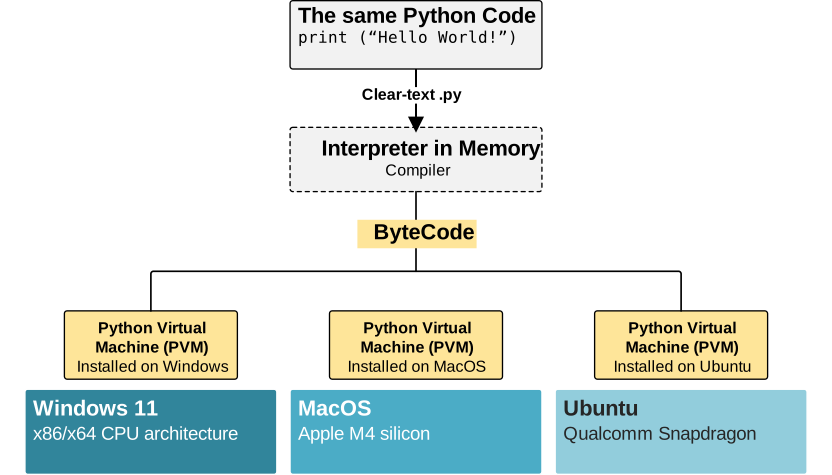
This design allows the programmer to focus on the task rather than the platform.
As network engineers, we can write a script that connects routers, collects interface information, or checks configured VLANs. We do not need to create separate source-code versions for Intel, AMD, or Apple processors. The interpreter takes care of the platform-specific details.
The Main Trade-Off
To finish this part, let’s summarize that:
- Compiled languages usually focus more on execution speed, early error detection, and direct control over the final program.
- Interpreted languages usually focus more on flexibility, portability, faster development, and easier testing.
Neither approach is always better.
- A compiled language may be the right choice for an operating system, device driver, high-performance, or real-time application.
- An interpreted language such as Python may be the better choice for network automation, API integration, data processing, and administrative scripts.
Everything depends on the problem you are trying to solve. For network engineers, development speed and readable code are often more valuable than saving CPU time. This is one of the main reasons Python has become the dominant language for network automation.
Dynamically typed vs Statically typed languages
An additional important property of programming languages is whether the language is dynamically or statically typed. The difference is mainly about when a programming language checks the data type of a variable.
Full Content Access is for Subscribed Users Only...
- Learn any CCNA, CCIE or Network Automation topic with animated explanation.
- We focus on simplicity. Networking tutorials and examples written in simple, understandable language.