In this lesson, we discuss the concept of Python data types. However, before we examine the different data types, we first need to understand one of the most basic concepts in Python: variables.
What Is a Variable?
A variable is a name that allows Python to refer to a value stored in memory. A variable is created with an "assignment" statement. The assignment operator is written as a single equal sign =. The variable name is on the left, while the value is on the right, as shown below.
ip = "10.1.1.1"This statement creates the variable ip and assigns the string value "10.1.1.1" to it.
The Warehouse Analogy
To understand the concept, let's make an analogy with something familiar. Imagine a large warehouse. That is your computer's RAM. Inside, there are thousands of boxes sitting on shelves. Each box holds something.
Using this physical world example, creating this variable can be described in three simple steps:
- Python creates a new box somewhere in the warehouse (in RAM).
- It writes the label ip and sticks that label on the box (the variable name).
- It puts the value "10.1.1.1" inside that box (the variable value).
The concept is illustrated in the diagram below.
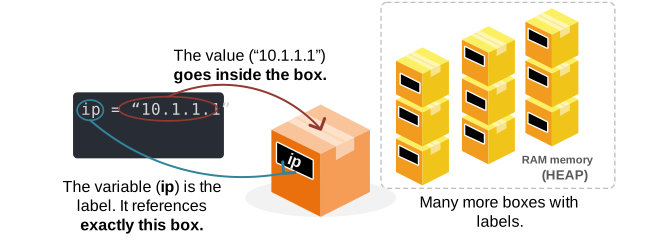
This is pretty much how variables work in Python at a high level. The box represents the Python object. The value inside the box is the string "10.1.1.1", while the label represents the variable name ip.
Now, when I want to use this variable, for example, I want to print it in the terminal with print(ip). The reverse process takes place. Python sees the name ip, which points to the exact box that holds the value. It takes the value and prints it in the terminal.
In reality, the box is an object in memory, and the name is a pointer to that address in memory. Now, let's see this in practice. Let's create the variable and print the exact memory address where Python stores it on my computer.
ip = "10.1.1.1"
print(hex(id(ip)))
Output:
0x782dcaaada70Notice that function id() returns the virtual memory address where Python stored the string "10.1.1.1" in RAM, and hex() converts that memory address to hex. Since I work on Windows with a 64-bit x86 Intel processor, this gives us the actual 64-bit address pointer where the object is stored in my computer's memory. Since the leading bits are zeros, Python truncates them. However, the actual address is as follows:
0x0000782DCAAADA70 #64-bit address pointerNow, let's visualize this in the following diagram. When I execute this code on my computer, Python stores the value ("10.1.1.1") into the RAM at memory address 0x0000782DCAAADA70, as shown below.
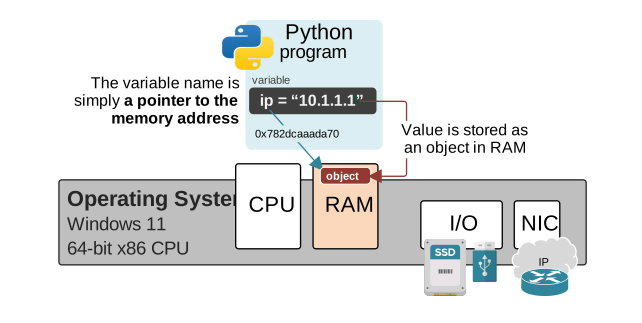
This is a very simplified model, but it gives us one very important concept to understand about Python variables:
The variable is not the object itself. It is a name that refers to the object in memory.
The name ip is an entry in a Python namespace that refers to an object in memory. The value is stored in the object. CPython and the operating system handle the low-level memory details for us.
Every time I use the variable (ip), for example, when I print(ip), I tell Python to retrieve the object stored at that memory address and print it to the terminal.
It is very important to have a correct understanding of variables from the very beginning.
How do variables work?
Now let's dive a little bit more into how variables work, because it is the foundation for concepts like mutable vs. immutable objects and many more.
Now let's see what happens if I assign a new value to the same variable ip, as shown below.
ip = "5.5.5.5"Using the box analogy, many people automatically assume that if I assign a new value to the same variable, Python will open the box and remove the old value ("10.1.1.1") and insert a new value ("5.5.5.5").
However, it doesn't work like that. What really happens is that Python creates a new box, stores the value ("5.5.5.5"), and slaps the label (ip) on this new box, as shown in the diagram below.
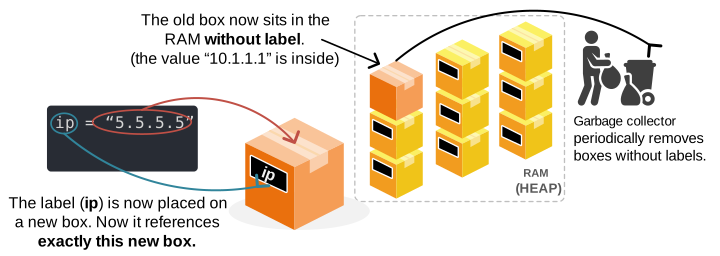
The old box, which holds the old value "10.1.1.1," now sits in RAM without a label. A CPython process called the Garbage Collector periodically removes such boxes from the memory.
Let's verify this in practice on the command line. Let's assign a new value to the ip variable and print the memory address:
ip = "5.5.5.5"
print(hex(id(ip)))
Output:
0x7801304b1b90You can see that Python stored that value in a different memory address. But what happened with the old one? The garbage collector removed the old object from memory because no variable refers to it.
One object can have several names
Now let's introduce another important concept. More than one variable name can refer to the same object. Wait what?
Let's explain this concept using the warehouse analogy again, as illustrated in the diagram below.
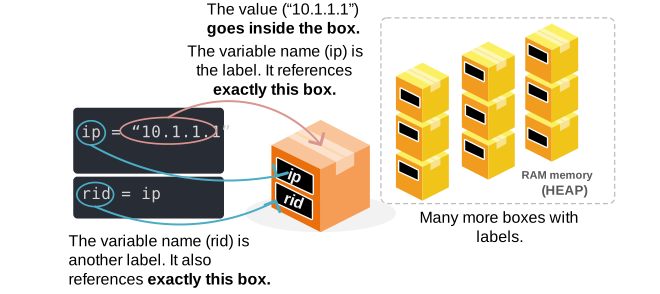
Let's show what this means in practice in Python code. Consider the following code:
ip = "10.1.1.1"
rid = ip
print(hex(id(ip)))
print(hex(id(rid)))
Output:
0x7c9834d35ab0
0x7c9834d35ab0
You can see that both variables ip and rid point to the same memory address. Basically, they point to the same object. They are labels on the same box in the warehouse analogy.
When I wrote rid = ip, Python didn't create a new box. It made a new label and slapped it on the same box that ip was pointing to, as shown in the diagram above.
This concept is important even if you don't fully understand the implications yet. It is important to have the right context from the very beginning. It will clear up a lot of confusion in Python later on.
Python Data Types
Why Python Uses Different Data Types
Now let's introduce data types using the same analogy. We already know that a variable is a named box holding a value; now we must address another critical question:
What kind of value is inside that box?
Imagine we are in the warehouse. In the real world, you would not store engine oil in a cardboard box, nor would you store sharp pieces of glass in a plastic bag, right? Different materials require different containers designed for their specific properties.
The same principle applies to Python. It has different objects designed for different data types and their specific properties. Python uses different kinds of objects to represent different kinds of data. An object that holds text behaves differently from an object that holds a number or a simple true-or-false value.
Each variable name refers to an object in memory. However, the objects contain different kinds of values:
- "10.1.1.1" is text.
- 1500 is a whole number.
- 37.5 is a decimal number.
- True is a true-or-false value.
These different kinds of values are called data types. A data type tells Python:
- What kind of value an object represents.
- Which operations can be performed on it.
- How the value should behave when used.
Using our warehouse analogy, we can imagine that each box has a design suited to its contents. One box is made for text, another for whole numbers, and another for collections of values and so on.
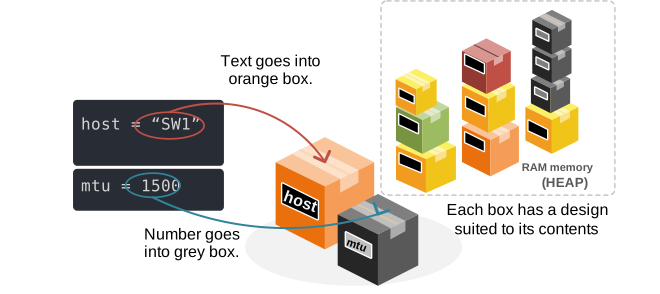
Notice that the data type is a property of the box, not of the label. In Python, this means that the object itself has the data type. The variable name is only a label that refers to that object.
Why not store everything as the same data type?
At this point, you may wonder why Python cannot treat all data in the same way as one general data type. Why does it need to know whether 1500 is a number or text? Consider these two values:
mtu = 1500       #integer
overhead = "20"  #string
new_size = mtu + overhead
print(new_size)
Output:
Traceback (most recent call last):
  File "<main.py>", line 3, in <module>
TypeError: unsupported operand type(s) for +: 'int' and 'str'
The code crashes. Why? Because Python tries to add a number with text. This is an incompatible mathematical operation.
This is one of the main reasons Python needs data types. The type gives meaning to the value and tells the program how an operation should work. Without data types, Python would not know whether to add two numbers or concatenate two strings.
Data Type defines the Object’s behavior
A data type does more than describe what a value looks like. It also defines what the object can do. For example, a string object provides operations designed for text:
hostname = "router1"
print(hostname.upper())
Output:
ROUTER1The upper() method converts lowercase letters to uppercase letters. This operation makes sense for text. However, it would make no sense to convert an MTU value to uppercase:
mtu = 1500The number 1500 does not contain lowercase or uppercase letters. Numbers support different operations:
mtu = 1500
overhead = 20
total_size = mtu + overhead
print(total_size)
Output:
1520Mathematical addition makes sense for numeric values, not for text.
Every Python Object Has a Type
Remember that every object in Python has a data type. Python provides the built-in type() function so that we can inspect it. Consider the following example:
ip = "10.1.1.1"
print(type(ip))
Output:
<class 'str'>The output tells us that ip refers to an object of type str. The name str is short for string. A string represents text.
Built-in Python Data Types
Python includes several built-in data types. Each one is designed for a different purpose. The main types are as follows and are shown in the diagram below.
- str for text
- int for whole numbers
- float for decimal numbers
- bool for true-or-false values
- list for ordered collections that can change
- tuple for ordered collections that should remain fixed
- dict for key-value pairs
- set for collections of unique values
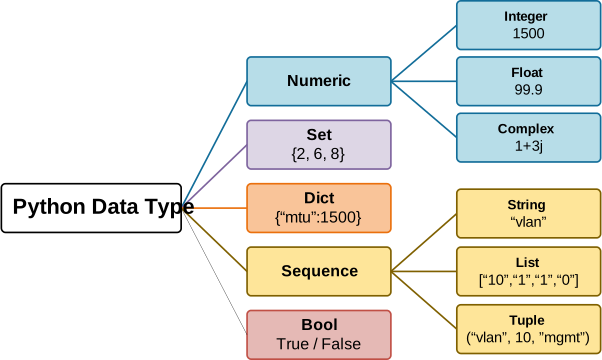
For now, we won't get into the details of every data type. It is important to understand how variables work and why objects have data types. Everything will fall in place when we see the different types in detail and start with the practice lesson.
Python Is Dynamically Typed
Lastly, let's reemphasize that Python is a dynamically typed language. This means that you do not have to declare the type of a variable before using it. For example, you can write:
mtu = 1500You do not need to tell Python that mtu will refer to an integer. Python sees the value 1500, recognizes it as an integer, and binds the name mtu to that integer object. Then, when it creates the object in memory, it adds the data type to the object, as shown in the diagram below.
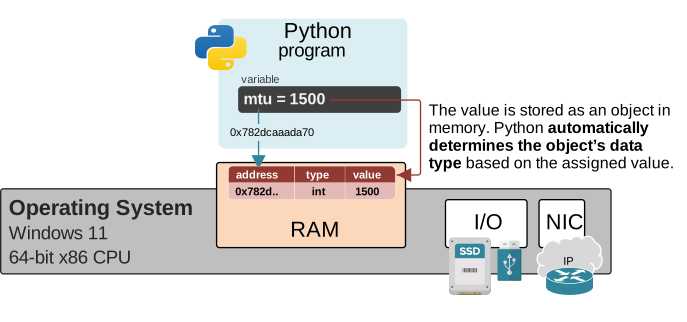
Remember that the data type is a part of the object, not of the variable name.
As a network engineer, I like to think of a Python object as a network packet. A packet carries a payload, but it also includes headers that provide context about the data, such as its Ethernet, IP, and TCP headers.
A Python object follows a similar idea. The value is like the packet payload, while the other information that the object has is like headers - address header, data type header, reference count header, etc. They tell Python what the value represents and how it should behave.
Key Takeaways
The goal of this lesson is to give you the proper context to understand the different data types when we start using each one in the following lessons. It also gives you the context to understand how variables work. The goal is not to understand each data type in detail. We have a separate lesson for each type.
The relationship between variables, objects, values, and data types can be summarized as follows:
- A variable is a name. A label that can be slapped on a box.
- The variable name refers to an object.
- The object exists in the program’s memory.
- The object has a memory address.
- The object contains or represents a value.
- The object has a data type.
- Python determines the data type automatically from the given value because Python is a dynamically typed language.
- The data type defines how the object behaves and what operations can be performed on it.
- There are several built-in data types.
- Custom types can be defined when we go to object-oriented programming (OOP). For example, there is no data type ip_address, but we will create one later in the course.
- One variable can later refer to another object.
- Several variables can refer to the same object.